
Introduction
async/await was introduced to solve an issue that Promises was trying to move away from, the callback hell.
With Promises, chaining several .then(cb)s makes the code hard to read/follow.
async/await solves this issue by doing away with .then(cb) as we shall see.
async/awaitdoes not replace promises but changes how we ‘consume’ Promises.
async/await is built on Promises and Generators and was introduced in ES2017 as a new spec.
Doing async/await correctly
It’s easy to mix async/await with the .then(cb) syntax that Promises had to offer in ES6:
async/await and Promises are inter-operable. With async/await offering a better way of consuming Promises
Promises in summary
Promises represent proxy values that will be available in the future depending on whether the Promise fulfills with a value or is rejected with an error
A promise can be in any of one of these states:
pendingstate - Initial state, operation not fulfilled/rejectedfulfilledstate - operation completely successfullyrejectedstate- operation failed
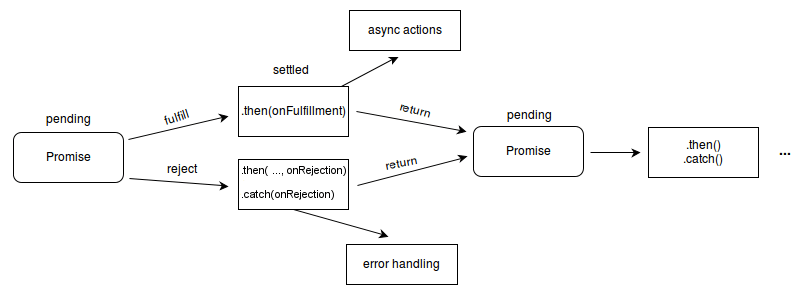
Image credits MDN
Example in code:
// creating a promise
const fetchFakeUser = () => {

  return new Promise((resolve, reject) => {
    // simulate a delay e.g when fetching data over HTTP
    setTimeout(() => {
       resolve({user: 'Itachi Uchiha', token: 'e66d515e-6cbe-46d0-9f22-8705a17b5b6d'})
    }, 5000) // delay for 5 seconds
  })
}

// consuming the promise

fetchFakeUser()
  .then(data => {
    // use the data(value) resolved in the promise
    console.log(data) // {user: 'Itachi Uchiha', token: 'e66d515e-6cbe-46d0-9f22-8705a17b5b6d'}
  })
Promises can be chained: multiple .then()s can be chained on the promise
const myPromise = () => {
  return new Promise((resolve, reject) => {
    setTimeout(() => {
       resolve(10)
    }, 2000)
  })
}

myPromise()
  .then(val => {return val + 1}) // 11
  .then(val => {return val + 1}) //12
  .catch(err => console.log(err))
.catch(cb) handles any error from promise rejection.
How async/await changes how we consume Promises
Async await does away with the .then() and employs async and await when consuming a Promise.
The above becomes:
const main = async () => {
  try {
    const val = await myPromise()
    return val
  } catch(err) {
    // handle error from promise rejection here
  }
}
We make our function async and append await to myPromise() call then use the returned value as one would in a regular function.
Where the mix up comes in:
Mixing async/await and .then
For example:(from the snippet above:) it’s tempting to do:
const user = await fetchFakeUser().then(user => {
  if(user) return user
  // preceding lines of code
}).catch(err => {
  // do something
})
summary
async/await does away with the need to use .then(cb) and .catch(cb) when consuming promises. All we need is to:
- Append
asyncto the function that will be consuming a promise to useawait - Wrap call to the function that returns a
Promiseinside atry...catch(e) {}block - Store the value return from the function in a variable and prepend
awaitto the function returning a promise.
Note: Always remember to prepend await to a function call that returns a promise